

Sales CRM: pipeline, follow-up, and data without leaks
A practical sales CRM guide: how to organize pipeline, follow-up, commercial data, and automation so opportunities do not fall through.
Open a sales CRM and you should be able to see who needs a reply, what was discussed and who owns the next task. When it only stores names and phone numbers, the team still has to piece together each sale from chats and memory. Define the follow-up process before adding more software.
Salesforce reports that nine in ten sales teams use AI agents or expect to use them within two years, across moments from planning to quoting (State of Sales). HubSpot also reports that personalization and segmentation continue to support leads and purchases (State of Marketing 2026). These tools depend on customer records that the team keeps up to date.
Why CRMs break inside sales teams
A CRM becomes a chore when each seller records different details and nobody agrees on what the stages mean. Missing campaign information makes it harder to understand why a person contacted you. Sellers stop checking the records, and managers can no longer rely on the reports.
A sales CRM should answer operating questions: which opportunities are ready, which need follow-up, which channel brought better leads, why proposals are lost, and which tasks are due this week. If it cannot answer that, the team goes back to spreadsheets, chats, and memory.
For our growth and measurement work at Metanoia, we agree on the pipeline stages and who owns each task before setting up automation.
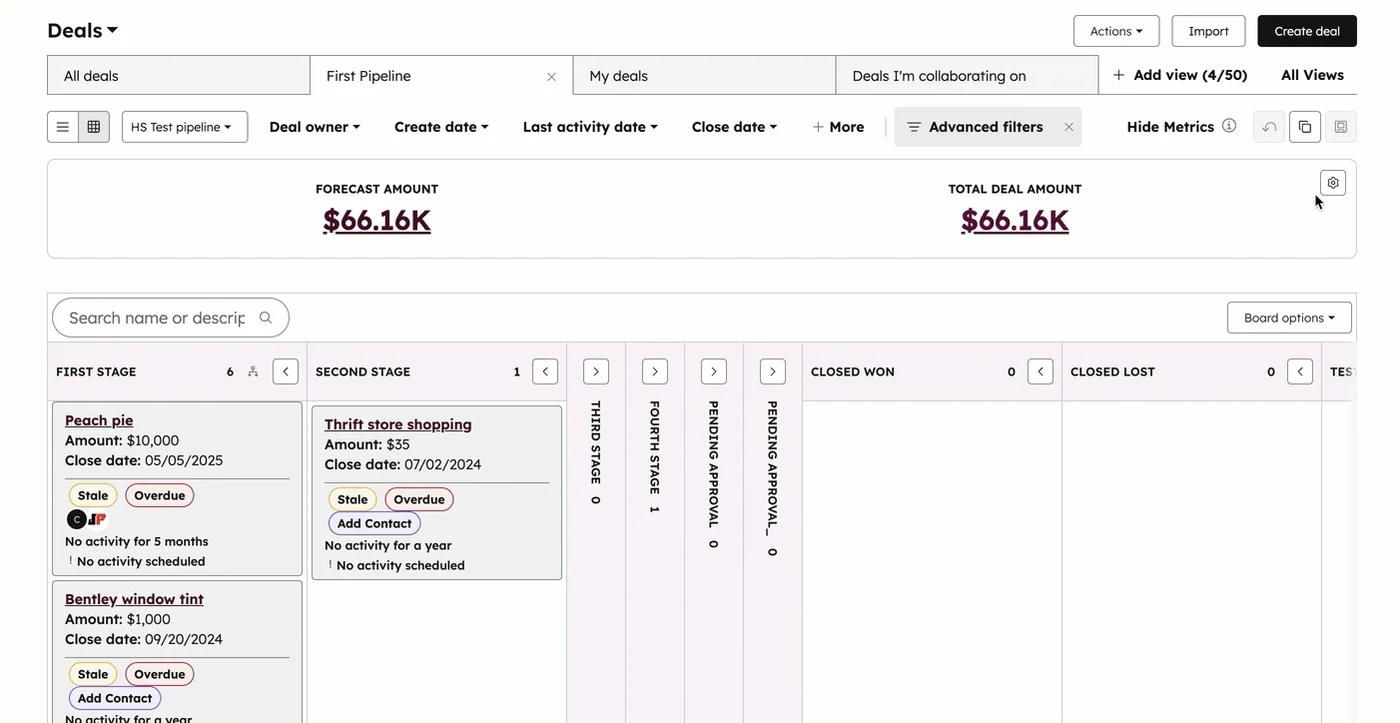
In this official HubSpot example, stage columns sit alongside Stale and Overdue labels and a notice that no activity is scheduled. These are the records to inspect when a pipeline has value on paper but follow-up has stopped.
Define the stages in your sales pipeline
Give every pipeline stage a definition. New contact, qualification, diagnosis, proposal, negotiation and close can be enough to start. Agree on what must happen before a deal moves forward. Before preparing a proposal, for example, confirm the problem, who will decide and what happens after you send it.
Alongside the name, email and phone number, record how the person found you and which service they asked about. Keep the campaign, objections, urgency, approximate budget and last interaction in the record. A colleague taking over should be able to reply without asking the customer to start again.
Automation should be selective. Creating tasks, reminding follow-ups, assigning opportunities, and notifying stage changes can help. Automating sensitive conversations without judgment can damage trust. A good CRM combines clear rules with human involvement where the sale needs judgment.
Which CRM model best supports sales follow-up?
Compare a pipeline with entry and exit criteria, one based on sales activities, and a contact log where each person uses their own labels.
Scroll sideways in the table to compare all three options.
| Evaluation criterion | Suggested optionCriteria-based pipelineStages have defined entry, exit, next action, owner, and loss reason. | Activity-based pipelineStages reflect calls, demos, or proposals, not always buying evidence. | Free-form contact logEach person records notes and states using their own criteria. |
|---|---|---|---|
| Commercial priorityAbility to show which opportunity deserves attention today. | 5 out of 5 for this scenarioThe stage and next step rest on shared evidence and visible dates. | 3 out of 5 for this scenarioShows recent activity, but a completed demo does not confirm purchase intent. | 1 out of 5 for this scenarioPriority depends on reading notes and each seller's individual judgment. |
| Forecast qualityHow well the forecast distinguishes completed sales tasks from buyer decisions. | 5 out of 5 for this scenarioExit criteria and calibrated probabilities allow forecasts to be compared with outcomes. | 3 out of 5 for this scenarioActivities add signal, but can inflate stages without a buyer decision. | 1 out of 5 for this scenarioInconsistent states prevent a comparable forecast baseline. |
| Team adoptionBalance between capture discipline and daily usefulness for sales. | 4 out of 5 for this scenarioA few required fields feed the views that sellers use to plan their follow-up. | 4 out of 5 for this scenarioIt is easy to understand because it follows the team's everyday actions. | 3 out of 5 for this scenarioAllows free-form notes, but the team must reconstruct the context in every review. |
| Safe automationAbility to trigger tasks and alerts without automating ambiguous decisions. | 5 out of 5 for this scenarioRules rely on defined stage, owner, and due-date changes. | 3 out of 5 for this scenarioIt can automate reminders, although activity does not always represent progress. | 1 out of 5 for this scenarioInconsistent stage names make automation rules and reports harder to maintain. |
| Context integrationConnection between source, campaign, conversation, opportunity, and outcome. | 5 out of 5 for this scenarioDefines shared fields and identifiers to connect forms, CRM, and channels. | 3 out of 5 for this scenarioIntegrates activity, but usually needs extra fields for attribution and quality. | 2 out of 5 for this scenarioAccepts varied data, but normalization limits how much can be reused. |
Practical sales CRM checklist
Before configuring or cleaning your CRM, review:
- Each pipeline stage has a definition and advancement criteria.
- Required fields are few, useful, and easy to maintain.
- Marketing shares source, campaign, and content consumed by the lead.
- Follow-up tasks have date, owner, and expected outcome.
- Loss reasons use clear categories.
- Dashboards separate volume, conversion, value, and speed.
- Automations reduce repetitive work without hiding important conversations.
- The CRM connects with the website, forms, and channels like WhatsApp.
Example: if someone arrives from a landing page about websites that convert, the CRM should show that source, assign a task, suggest the initial message, and record whether the contact moved to diagnosis.
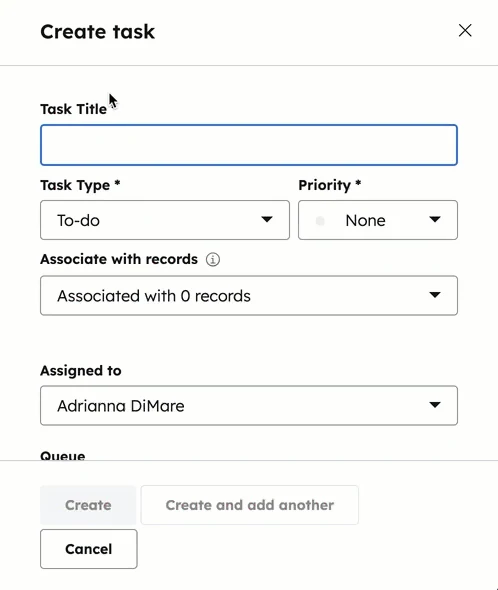
Make the next action a task linked to the right record and owner. HubSpot's task panel exposes those choices together, so the person taking over can find the customer context.
FAQ about sales CRM
Which CRM should a small business choose?
Test whether the team can update a deal and find the next task without help. Define the stages, fields, reports and owners before comparing platforms. A tool that is difficult to maintain will leave you with incomplete records.
How many stages should a pipeline have?
As many as the team needs to make decisions. Too many stages reduce usage. Too few stages make reports vague and hide where opportunities get stuck.
Which data is essential?
Record the source, stage, owner, next action, follow-up date, estimated value, main need and loss or close reason. Managers can use those fields to review stalled deals and assign follow-ups.
When should automation be used?
Automate repetitive tasks, reminders, assignments, and alerts. Keep human judgment for diagnosis, negotiation, objections, and relationship-sensitive messages.
If your CRM needs to connect with web, marketing, and operations, review growth and measurement or start a conversation through contact.
Latest articles

SEO for business: useful content for AI search

Websites that convert: clarity, UX, and speed

Omnichannel support: WhatsApp, forms, and connected follow-up

Marketing and sales dashboards: metrics for better decisions